User interface
A balance of simplicity and power
Neovim's user interface emphasizes minimalism and efficiency, resulting in a clean, distraction-free environment optimized for productivity. Unlike conventional development environments, it removes unnecessary interface elements, focusing on essential functionality.
The workspace is highly configurable, adapting to specific requirements. Its terminal-based design guarantees speed and responsiveness, while its modular architecture supports extensive customization by using plugins and configurations.
Extensibility defines Neovim's interface. A robust plugin ecosystem allows enhancement of all UI aspects such as status lines, buffer management, syntax highlighting, and file navigation. This flexibility produces a functional yet visually refined environment, establishing Neovim as a versatile tool for developers, writers, and power users.
Neovim supports extensive customization of aesthetics and functionality. Users tailor keybindings, themes, and layout options to their workflows, converting Neovim from a text editor into a personalized workspace that boosts efficiency and usability.
Rocksmarker user interface
Rocksmarker's UI plugins enhance the visual experience and usability of Neovim, creating a polished and efficient workspace for users. These plugins focus on improving the editor's appearance, navigation, and overall user experience, ensuring that you can work comfortably and productively.
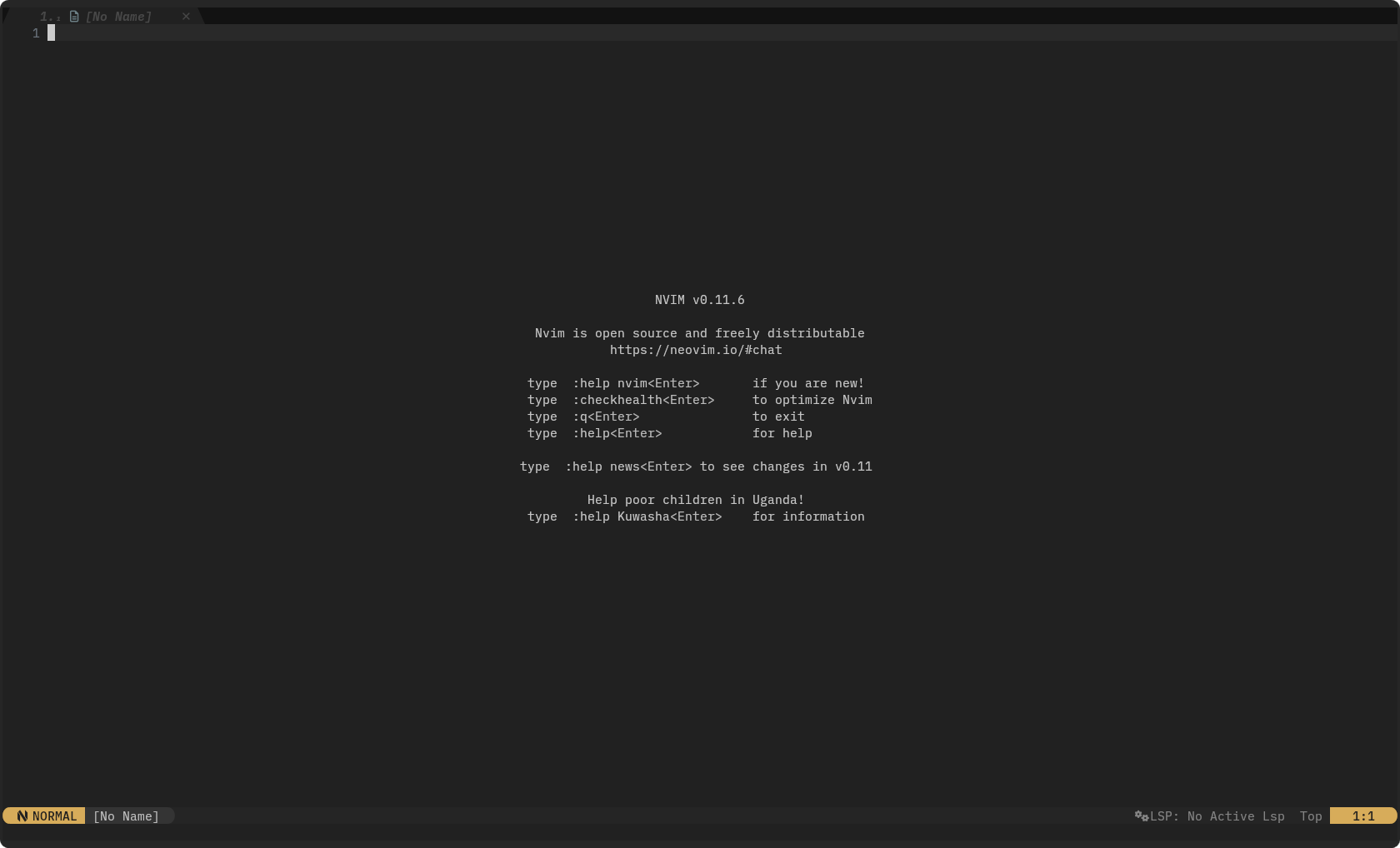
Rocksmarker UI
From minimalist colorschemes and customizable status lines to buffer management and Git integration, the UI plugins give a cohesive and visually appealing environment.
Plugins details
min-theme.nvim
min-theme.nvim is a minimalist colorscheme designed to offer a clean and distraction-free interface in Neovim.
It emphasizes readability and simplicity, making it ideal for users who prefer a focused and uncluttered editing environment. With its subtle colors palette and thoughtful syntax highlighting, min-theme.nvim reduces visual noise, allowing you to concentrate on your work without unnecessary distractions.
Key Features-
- Distraction-Free Design: Uses a soft and muted colors palette to minimize eye strain and improve focus.
- Syntax Highlighting: Provides clear and consistent syntax highlighting for a variety of programming languages and file types.
- Customizable: Enables customization of colors and styles according to user preferences.
- Performance: Optimized for speed and efficiency, ensuring a smooth editing experience.
lualine.nvim
lualine.nvim is a highly customizable and elegant statusline plugin for Neovim, designed to present critical information, including file status, Git branch details, diagnostics, and LSP updates, in a compact, visually consistent format optimized for rapid recognition.

Positioned at the bottom (or top) of your editor, it acts as a real-time dashboard, ensuring that you always have essential context about your project and workflow without cluttering your workspace.
lualine.nvim distinguishes itself through its modular and adaptable architecture, enabling customization of the statusline to user specifications.
Users can insert, delete, or reposition components, select from many themes and color schemes, and incorporate custom elements to align with their workflow.
This level of customization makes it an indispensable tool for developers, writers, and power users who demand both functionality and aesthetics from their editor. By providing instant feedback on your editing environment, lualine.nvim enhances productivity and helps you stay focused on your tasks, making it a cornerstone of an efficient and polished Neovim setup.
Key Features-
- Modular Design: Supports custom components, allowing you to tailor the statusline to your workflow.
- Extensible: Customize displayed sections to show only the information that matters most to you.
- Performance: Lightweight and optimized for fast rendering, even in large projects.
bufferline.nvim
bufferline.nvim is a powerful tabline plugin that provides an intuitive and efficient way to manage open buffers in Neovim.

bufferline.nvim presents buffers in a tab interface to support rapid file switching, buffer closure, and workspace reorganization with minimal user input. This buffer presentation is especially effective in workflows involving many files. It reduces dependence on window management and removes the need to manually recall file names.
The plugin supports customizable visual attributes, including icons, colors, and grouping behavior. Users can configure these settings to match their layout preferences, helping reduce cognitive load during extended editing sessions.
It maps standard keybindings directly to common buffer operations such as closing, moving, or reordering. This enables consistent and efficient navigation without requiring external configuration.
Key Features-
- Tab-Style Interface: Renders buffers as tabs for efficient file navigation.
- Customizable Appearance: Supports icons, colors, and grouping to match your preferred workflow.
- Keybindings: Includes built-in shortcuts for common actions, such as closing or moving buffers.
- Integration: Works seamlessly with other UI plugins, such as
gitsigns.nvim, to give additional context.
gitsigns.nvim
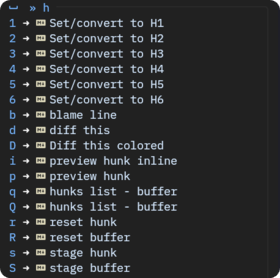
gitsigns.nvim integrates Git functionality into Neovim, providing real-time visual feedback on codebase changes.
The plugin annotates additions, deletions, and modifications in the sign column. This allows immediate identification of changes since the last commit. Colors-coded indicators enable rapid assessment of change scope, supporting progress tracking, modification review, and team collaboration.
gitsigns.nvim includes interactive features: hunk staging, blame annotations, and diff previews, all accessible within the editor. This integration optimizes version control and improves coding efficiency.

Gitsign preview
The performance-focused architecture guarantees responsive operation, even in extensive repositories, positioning it as a critical tool for developers who demand accuracy and teamwork.
Key Features-
- Visual Indicators: Shows Git changes in the sign column, including additions, deletions, and line modifications.
- Blame Annotation: Displays author and commit information for each line, helping you understand the history of your code.
- Interactive: Enables staging hunks, previewing changes, and navigating commits within the editor.
- Performance: Designed to handle large repositories without slowing down your workflow.
persisted.nvim
persisted.nvim is a powerful session management plugin designed to preserve your Neovim workspace with minimal effort.
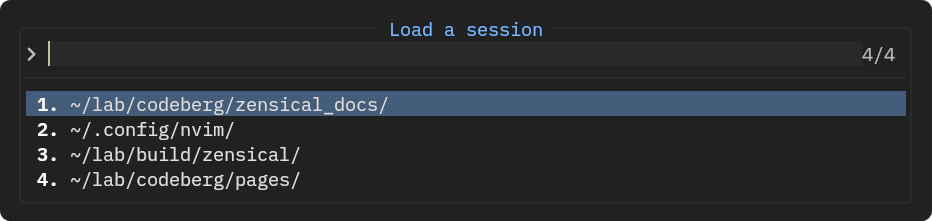
persisted.nvim stores and retrieves editing sessions, covering open buffers, window layouts, and cursor positions. Sessions restore to their earlier state after editor closure and reopening.
This feature is essential for lengthy or intricate projects, where manually reopening files and reorganizing windows reduces efficiency.
The plugin automates session state preservation and enables one-command restoration. It targets developers, writers, and users handling multi-file projects, ensuring a stable and responsive Neovim environment.
Key Features-
- Automatic Session Saving: Saves your session automatically when you exit Neovim.
- Restoration: Restores your layout, buffers, and cursor positions with a single command.
rainbow-delimiters.nvim
rainbow-delimiters.nvim significantly enhances code readability by coloring matching delimiters such as parentheses, brackets, and braces in distinct, vibrant colors.
This visual differentiation makes it effortless to identify nested structures, helping you quickly grasp the scope and hierarchy of your code.
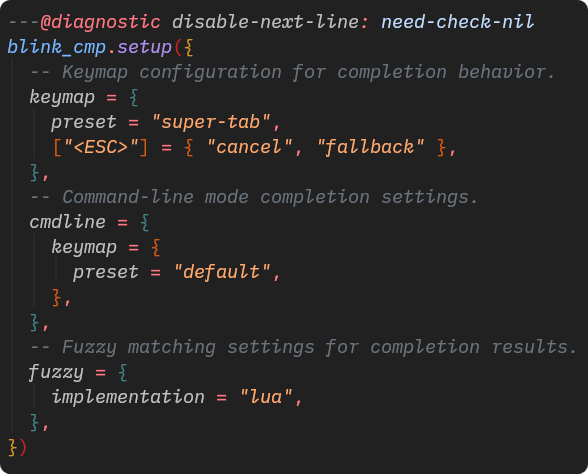
Rainbow delimiters
By providing a clear visual guide, the plugin reduces the cognitive load associated with tracking complex expressions, thereby minimizing syntax errors and improving overall code comprehension.
This plugin is particularly valuable for developers working with deeply nested code or intricate data structures, where matching pairs of delimiters can be difficult to follow.
Its lightweight and non-intrusive design ensures that it integrates seamlessly into your workflow, making it an essential tool for anyone looking to enhance clarity and precision in their coding process.
Key Features-
- Colors-Coded Delimiters: Assigns unique colors to matching pairs, improving visual clarity.
- Customizable: Permits customization of colors and styles according to user preferences.
- Lightweight: Designed to be fast and non-intrusive, ensuring a smooth editing experience.
which-key.nvim
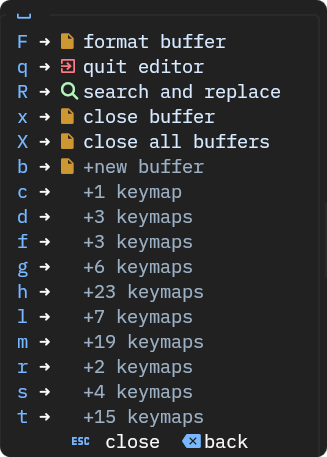
which-key.nvim is an intelligent keybinding hint plugin that revolutionizes the way you interact with Neovim by displaying available keybindings in a dynamic menu as you type.
This feature not only helps you discover new shortcuts but also serves as a visual reference, reinforcing your memory of complex or infrequently used commands.
By providing contextual hints based on your current mode and key sequence, it reduces the need to memorize every binding, allowing you to focus on your work rather than recalling commands.
This plugin is particularly useful for new users learning Neovim's extensive keybinding system, and advanced users managing custom or intricate configurations.
Its customizable and user-friendly interface ensures that you can tailor keybindings to your workflow, transforming Neovim into a more accessible and productive environment.
Key Features-
- Dynamic Popup: Shows contextual keybindings based on your current mode and prefix.
- Customizable: Supports definition and organization of keybindings to align with user workflow.
- Visual Feedback: Provides clear and concise hints, reducing the need to memorize complex shortcuts.
snacks.nvim
snacks.nvim provides a set of focused utility functions to streamline Neovim operations. It delivers direct access to common actions such as file reloading, toggling settings (line numbers, spell check), and window management.
The plugin emphasizes practicality and efficiency, eliminating the need for custom scripts in user configurations. Its lightweight, non-intrusive design integrates with existing setups and supports customization, so users can extend or change utilities to match their workflow.
By reducing repetitive task, snacks.nvim maintains user focus and productivity. It is a functional addition for developers, writers, and power users seeking to optimize their editing process.
Key Features-
- Utility Commands: Includes handy commands for everyday tasks, such as toggling line numbers or spell check.
- Customizable: Permits extension and modification of utilities to match user requirements.
- Lightweight: Designed to be unobtrusive and intuitive.
nvim-highlight-colors
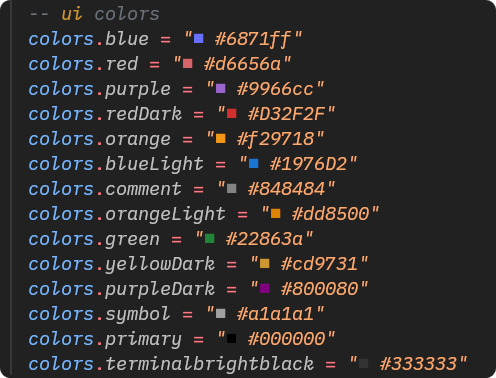
nvim-highlight-colors is a Neovim plugin that enhances code and documentation readability by rendering color codes directly in the buffer. It supports hex codes, RGB values, and named colors, displaying real-time swatches before to each reference for immediate visualization.
This functionality benefits designers, front-end developers, and technical writers by removing ambiguity in color selection and promoting consistency across projects. The plugin delivers instant visual feedback, optimizing the process of editing and refining colors. Its customizable, high-performance design ensures smooth operation, even in large files, making it a practical tool for users working with colors in code or documentation. Whether applied to web styling, theme design, or UI documentation, the plugin facilitates precise and confident workflows.
Key Features-
- Real-Time Preview: Displays colors swatches next to hex, RGB, or named colors codes.
- Customizable: Compatibility includes many color formats and permits customization of highlight presentation..
- Performance: Optimized for fast rendering, even in large files.
The UI plugins in Rocksmarker transform Neovim into a visually refined and highly functional editing environment. These plugins work together to give a seamless and enjoyable editing experience, whether you're coding, writing documentation, or managing complex projects.
The thoughtful integration of these tools ensures that your workspace is not only visually appealing but also tailored to your unique workflow, allowing you to focus on what matters most, creating high-quality content and code.