Git
Collaborative version control
Collaborative version control refers to systems and practices that enable many developers to work on the same codebase simultaneously while maintaining consistency, tracking changes, and managing conflicts.
These systems give a structured approach to sharing, reviewing, and integrating code contributions from distributed teams.
Benefits-
- Parallel Development: Teams work on many features or fixes simultaneously without interfering with each other.
- Transparency: Developers document all changes, clarifying the project's progression.
- Accountability: The system attributes contributions to specific individuals, which fosters responsibility and traceability.
- Disaster Recovery: The history and distributed nature of some systems allow recovery from errors or data loss.
Collaborative version control is essential for modern documentation development, enabling efficient teamwork, reducing errors, and maintaining the integrity of the codebase.
Git version control
Git is a distributed version control system that tracks changes in source code throughout the software development lifecycle. Unlike centralized systems, Git gives every developer a local copy of the entire repository, including full history and version-tracking capabilities. This architecture supports offline work, reduces dependency on a central server, and accelerates operations such as commits, branches, and merges.
By design, Git ensures coordination among team members, preserves a complete history of all modifications, and provides tools for efficient conflict resolution. Its decentralized nature, combined with robust merging and review workflows, makes it the standard for version control in both open source and enterprise environments.
Integration in Rocksmarker
Rocksmarker leverages the Neovim plugin ecosystem to embed Git functionality directly into the editor, optimizing version control workflows without leaving the development environment.
gitsigns.nvim
gitsigns.nvim is a Neovim plugin designed to integrate Git functionality directly into the editor’s interface. It provides real-time visual feedback on file changes, enabling developers to track modifications, navigate history, and manage version control without disrupting their workflow.
This code configures the gitsigns.nvim plugin in Neovim, defining visual indicators and keybindings for Git operations. Below are the main components:
| lua/plugins/ui.lua - Sign configuration | |
|---|---|
331 332 333 334 335 336 337 338 339 340 341 342 343 344 345 346 | |
Defines the symbols displayed in the editor's gutter for Git changes.
add: Lines added to the index.change: Modified lines.delete: Removed lines.topdelete: Deleted lines at the top of a hunk.changedelete: Lines modified and then deleted.untracked: Untracked lines.signs_staged: Same symbols, but for changes already staged in Git.- Symbols:
┃: Vertical bar for most changes.‾: Overline for top-deleted lines.~: Tilde for change-delete conflicts.┆: Broken vertical bar for untracked lines.
Keybinding setup (on_attach)
The on_attach callback executes when gitsigns.nvim initializes for a buffer. It receives the buffer number (bufnr) as an argument, allowing buffer-specific configurations.
on_attach = function(bufnr)
  -- Keybinding definitions here
end,
Helper Function: map
local function map(mode, l, r, opts)
  opts = opts or {}
  opts.buffer = bufnr
  vim.keymap.set(mode, l, r, opts)
end
| Parameter | Description | Example Values |
|---|---|---|
| mode | Keybind mode | "n", "v", "x" |
| l | Left-hand side (key combination) | "<leader>hs", "]c" |
| r | Right-hand side (function/command) | gitsigns.stage_hunk |
| opts | Additional options (e.g., description) | { desc = "stage hunk" } |
Keybindings
Navigation
map("n", "]c", function() ... end)
map("n", "[c", function() ... end)
]c: Jump to the next Git hunk (change block).[c: Jump to the previous Git hunk.- Fallback: Uses native Neovim diff navigation if in diff mode.
Hunk Actions
map("n", "<leader>hs", gitsigns.stage_hunk, { desc = "stage hunk" })
map("n", "<leader>hr", gitsigns.reset_hunk, { desc = "reset hunk" })
map("v", "<leader>hs", function() ... end)
map("v", "<leader>hr", function() ... end)
<leader>hs: Stage the hunk under the cursor (normal mode) or selected lines (visual mode).<leader>hr: Reset the hunk under the cursor or selected lines.
Buffer Actions
map("n", "<leader>hS", gitsigns.stage_buffer, { desc = "stage buffer" })
map("n", "<leader>hR", gitsigns.reset_buffer, { desc = "reset buffer" })
<leader>hS: Stage all changes in the current buffer.<leader>hR: Reset all changes in the current buffer.
Preview and Blame
map("n", "<leader>hp", gitsigns.preview_hunk, { desc = "preview hunk" })
map("n", "<leader>hi", gitsigns.preview_hunk_inline, { desc = "preview hunk inline" })
map("n", "<leader>hb", function() ... end, { desc = "blame line" })
<leader>hp: Open a popup with the hunk’s diff.<leader>hi: Show the hunk diff inline.<leader>hb: Show Git blame for the current line (author/commit).
Diff and Quickfix
map("n", "<leader>hd", gitsigns.diffthis, { desc = "diff this" })
map("n", "<leader>hD", function() ... end, { desc = "Diff this colored" })
map("n", "<leader>hq", gitsigns.setqflist, { desc = "hunks list - buffer" })
map("n", "<leader>hQ", function() ... end, { desc = "hunks list - all" })
<leader>hd: Show diff for the current file.<leader>hD: Show a colored diff against the previous commit.<leader>hq: Populate the quickfix list with hunks for the current buffer.<leader>hQ: Populate the quickfix list with hunks for all files.
Toggles
map("n", "<leader>tb", gitsigns.toggle_current_line_blame, { desc = "toggle cur line blame" })
map("n", "<leader>td", gitsigns.toggle_deleted, { desc = "toggle deleted" })
map("n", "<leader>tw", gitsigns.toggle_word_diff, { desc = "toggle word diff" })
<leader>tb: Toggle inline blame for the current line.<leader>td: Toggle visibility of deleted lines.<leader>tw: Toggle word-level diff highlighting.
Text Object
map({ "o", "x" }, "ih", gitsigns.select_hunk, { desc = "Select hunk" })
ih: Select the current hunk as a text object (for operators or visual mode).
The gitsigns.nvim configuration enhances Git workflows in Neovim with visual indicators for changes, including added, modified, and deleted lines. It supports efficient navigation between hunks, allowing users to move quickly through changes.
For staging and resetting, the setup provides precise control over individual hunks or entire buffers, ensuring only intended changes are committed. Preview features allow inline or popup diffs and blame annotations, offering context for each modification.
Dynamic toggles let users show or hide blame, deleted lines, and word diffs, adapting the interface to their needs. Buffer local bindings ensure smooth integration, keeping Git operations accessible without disrupting the editing experience.
Neogit
Neogit is a Neovim plugin that implements a Magit style interface for Git. It embeds version control operations directly into the editor, eliminating the need for external terminals or GUI tools. Developers manage repositories through a text based UI that centralizes status, diffs, commits, and branch operations in a single, navigable panel.
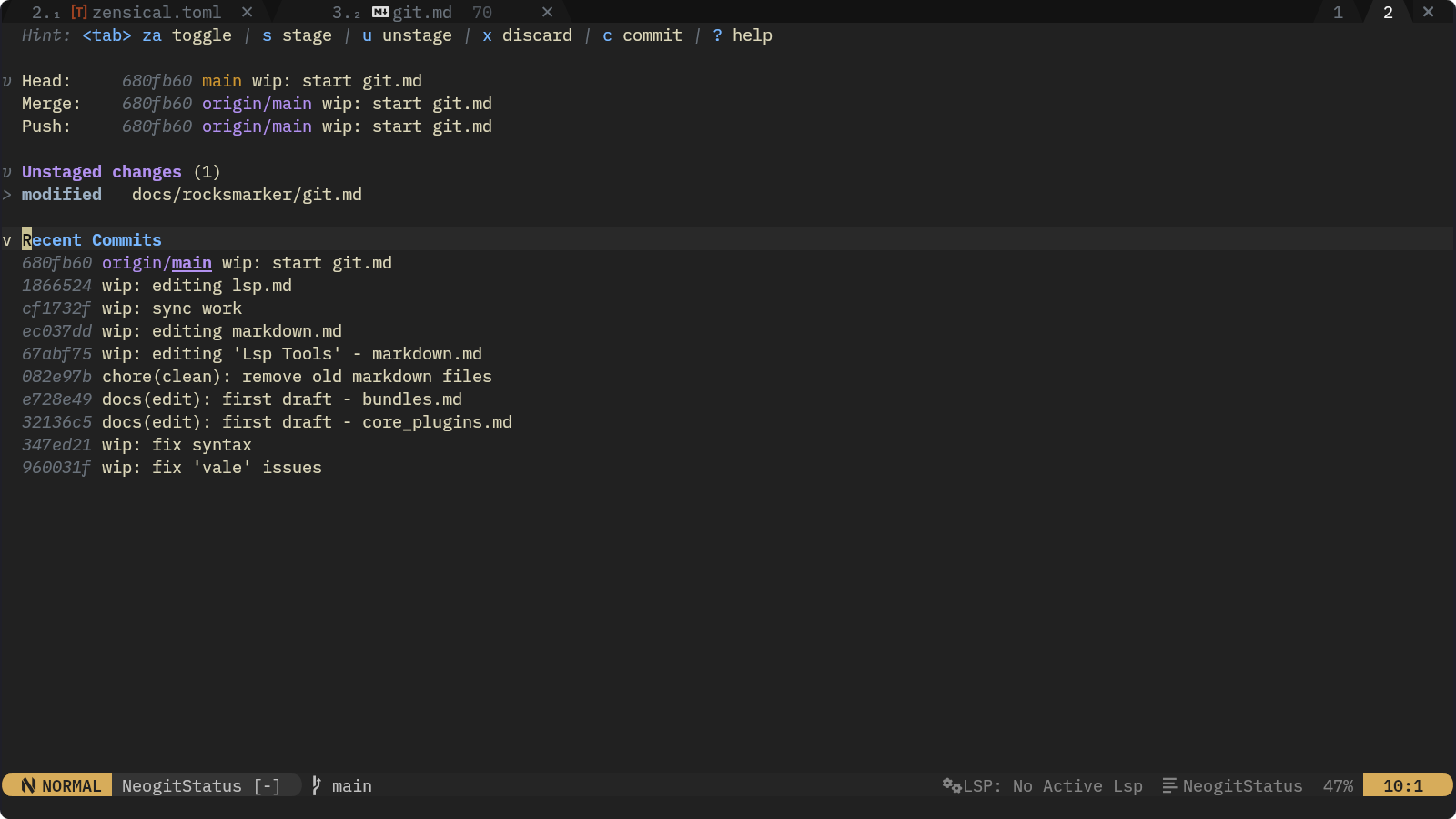
Neogit accelerates Git workflows with:
- Interactive staging for precise hunk or file level control.
- Branch and commit management with visual logs and diff previews.
- Built in conflict resolution for merges and rebases.
- Customizable layouts and keybindings to match user preferences.
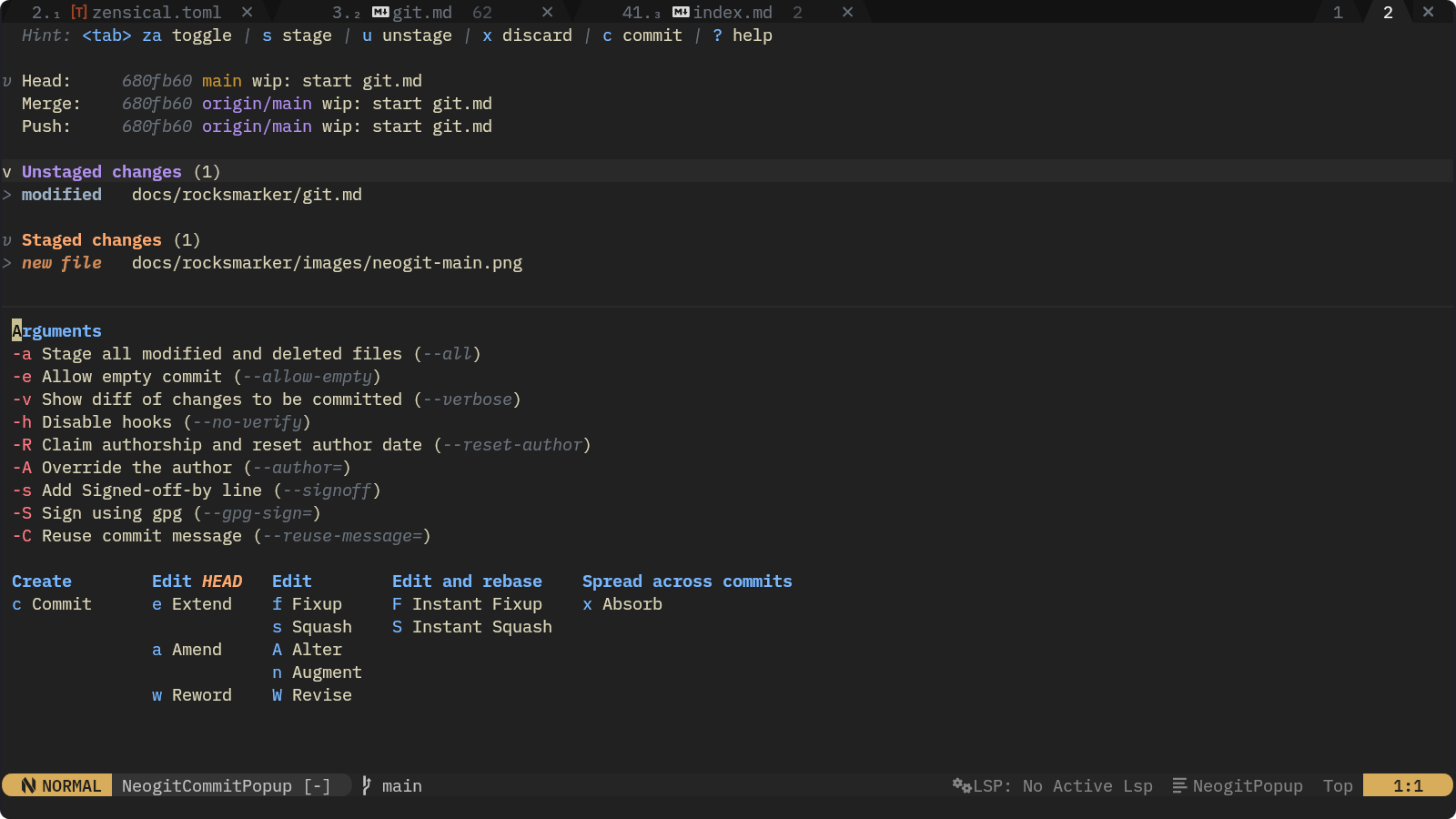
Neogit in Rocksmarker
Through rocks.nvim, the plugin manager in Rocksmarker, Neogit is ready to use immediately with no manual setup required. With Neogit, developers access a Git interface directly in Neovim by using the :Neogit command.
Rocksmarker ensures Neogit integrates seamlessly with other tools such as gitsigns.nvim, offering a complete version control solution without requiring additional configuration or require calls.
As a core tool for Git in Neovim, Neogit reduces context switching and maintains focus during development. Its seamless integration with plugins such as gitsigns.nvim provides a unified version control experience, optimizing both individual and collaborative coding sessions.
These plugins transform Neovim into a Git-aware IDE, reducing reliance on external tools and accelerating development cycles. For Rocksmarker users, this integration ensures version control is both visible and actionable within the same interface used for coding.