Diagnostic Plugins
Elevating code quality and consistency
Diagnostics are a cornerstone of modern code editing, providing real-time feedback on potential issues such as syntax errors, style violations, and logical inconsistencies. In Neovim, diagnostics are seamlessly integrated through the Language Server Protocol (LSP) and specialized plugins, transforming the editor into a proactive assistant that helps maintain clean, efficient, and error-free code.
By highlighting problems as you type, diagnostics enable developers and writers to identify and resolve issues immediately, reducing debugging time and improving overall code quality.
Whether you're working on complex codebases, configuration files, or structured documentation, diagnostics ensure that your work adheres to best practices and remains consistent and reliable.
Neovim's extensible architecture allows for deep customization of diagnostic tools, enabling users to tailor the experience to their specific needs. Plugins like nvim-lint, conform.nvim, and trouble.nvim enhance this functionality by providing automated linting, formatting, and intuitive issue navigation. These tools not only catch errors early but also enforce coding standards and style guidelines, making them indispensable for both developers and technical writers.
With diagnostics, Neovim becomes more than just an editor, it evolves into a smart and adaptive environment that actively supports your workflow, ensuring that your projects are polished, professional, and free of avoidable mistakes.
!!! note "Tools installation"
In Rocksmarker, plugins like nvim-lint and conform.nvim rely on external tools—such as linters and formatters—to provide their full functionality. However, these tools are not installed automatically with the plugins themselves. To ensure that nvim-lint can detect syntax errors and style violations, and that conform.nvim can format your code according to predefined standards, you need to install the required LSPs, linters, and formatters separately.
This is where mason-tool-installer.nvim comes into play. This plugin automates the installation of all necessary tools, ensuring that your environment is fully equipped to support the features provided by nvim-lint and conform.nvim.
Plugings details
nvim-lint
nvim-lint is a versatile and powerful plugin that integrates linters directly into Neovim, providing real-time feedback on potential issues in your code or documentation. It analyzes files for syntax errors, style violations, and other common problems, helping you maintain clean and consistent work. By supporting a wide range of linters for different languages and file types, nvim-lint ensures that your projects adhere to best practices and predefined standards.
lint.linters_by_ft = {
  markdown = { "markdownlint", "vale" },
  yaml = { "yamllint" },
  bash = { "shellcheck" },
  json = { "jsonlint" },
  vim = { "vint" },
}

---@diagnostic disable-next-line: need-check-nil
-- Configure specific options for markdownlint
lint.linters.markdownlint.args = {
  "--disable",
  "MD013", -- Disable rule MD013 (line length)
  "--disable",
  "MD046", -- Disable rule MD046 (code block style)
  "--",
}

vim.api.nvim_create_autocmd({ "BufWritePost" }, {
  callback = function()
    ---@diagnostic disable-next-line: need-check-nil
    lint.try_lint()
  end,
})
Key Features-
- Real-Time Feedback: Highlights errors and warnings as you type, allowing for immediate corrections.
- Extensible: Supports a broad selection of linters, making it adaptable to various programming languages and workflows.
- Customizable: Allows users to configure which linters to use and how they behave, tailoring the experience to specific needs.
- Seamless Integration: Works effortlessly with Neovim’s built-in LSP and other diagnostic tools for a unified feedback system.
conform.nvim
conform.nvim is an auto-formatting plugin designed to enforce consistent code style across your projects. It supports multiple formatting tools and can be configured to run automatically on save or manually on demand. By standardizing formatting, conform.nvim reduces debates over style and ensures that all files adhere to a predefined standard.
conform.setup({
  formatters_by_ft = {
    lua = { "stylua" },
    css = { "prettier" },
    html = { "prettier" },
    sh = { "shfmt" },
    bash = { "shfmt" },
    markdown = { "markdownlint" },
    yaml = { "yamlfmt" },
  },
  format_on_save = {
    timeout_ms = 1000,
    lsp_format = "fallback",
  },
})
Key Features-
- Multi-Language Support: Works with formatters for various programming languages and file types, including Markdown, Lua, and Python.
- Automatic Formatting: Can be set to format files automatically when saved, maintaining consistency without manual intervention.
- Customizable Rules: Allows users to define formatting rules and preferences, ensuring alignment with project or team standards.
- Efficiency: Improves workflow by reducing manual formatting tasks, allowing you to focus on writing and development.
trouble.nvim
trouble.nvim transforms Neovim's diagnostic display and quickfix list into a powerful and intuitive interface, designed to simplify the process of identifying, navigating, and resolving issues in your code. By presenting diagnostics in a structured and visually clear format, this plugin allows you to quickly locate problematic lines—whether they're errors, warnings, or other issues—and take corrective action without disrupting your workflow. Its user-friendly design ensures that you spend less time searching for problems and more time fixing them, making debugging a smoother and more efficient experience.
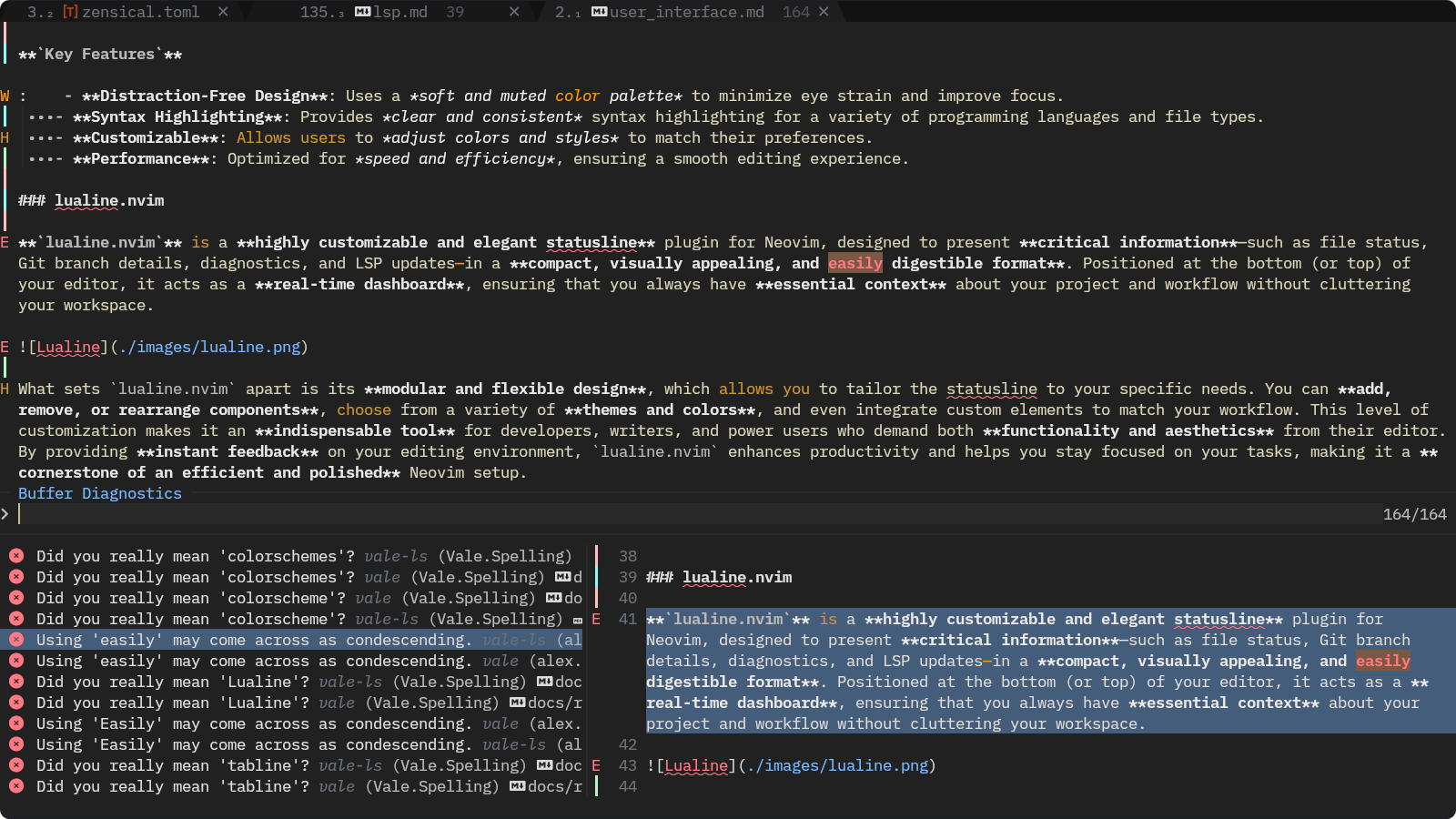
One of the standout features of trouble.nvim is its filtering capability, which lets you focus on specific types of diagnostics, such as syntax errors or style warnings. This targeted approach helps you prioritize and address issues more effectively, especially in large or complex projects. With seamless integration into Neovim’s LSP and diagnostic systems, trouble.nvim acts as a centralized hub for managing code quality, making it an essential tool for developers who value precision and productivity in their debugging process. Whether you're working on a small script or a sprawling codebase, this plugin ensures that you can tackle issues with confidence and ease.
trouble.setup()
Key Features-
- Improved Diagnostic Display: Presents diagnostics in a structured and easy-to-read format, improving clarity.
- Quick Navigation: Allows users to jump between errors and warnings with ease, speeding up issue resolution.
- Filtering: Supports filtering diagnostics by severity, type, or file, helping you prioritize and address issues efficiently.
- Integration: Works seamlessly with LSP and other diagnostic plugins, providing a centralized view of all issues.
In Rocksmarker, the combination of nvim-lint, conform.nvim, and trouble.nvim creates a comprehensive diagnostic ecosystem that elevates the editing experience for both developers and technical writers. These plugins work together to provide real-time linting, automated formatting, and intuitive issue navigation, ensuring that your code and documentation are consistent, error-free, and polished. By integrating these tools into a streamlined workflow, Rocksmarker transforms Neovim into a smart and proactive environment that actively supports your work.