Markdown Enhancements
Transforming your editor into a powerful writing environment
Markdown serves as the default format for documentation, README files, and structured content creation, valued for its clarity, accessibility, and adaptability. Neovim, with its extensible framework and robust plugin support, functions as an optimal Markdown editing environment.
Neovim's minimalist, configurable design allows for workflow refinement in Markdown editing. With the addition of relevant plugins, it provides advanced features such as syntax differentiation and intelligent formatting.
This adaptability positions Neovim as a capable replacement for dedicated Markdown editors, merging text editor efficiency with modern writing tool functionality.
Why use Neovim
Neovim is more than just a code editor, it is a versatile platform that adapts to a wide range of workflows, including Markdown authoring. Here's why Neovim is an excellent choice for working with Markdown:
- Speed and Efficiency: Neovim's minimalist design and keyboard-driven interface allow for fast and distraction-free writing, helping you focus on content creation.
- Extensibility: The plugin ecosystem supports live preview, callout integration, and other features that replicate the capabilities of widely used editors.
- Integration: Neovim seamlessly integrates with version control systems, LSP tools, and other productivity plugins, making it ideal for collaborative or technical writing projects.
Markdown in Rocksmarker
In Rocksmarker, markdown-plus.nvim and render-markdown.nvim integrate to deliver a cohesive, feature-rich Markdown editing environment. markdown-plus.nvim introduces advanced editing tools: intelligent list handling, formatting shortcuts and header navigation for efficient content structuring.
render-markdown.nvim renders Markdown elements, including headings, code blocks and lists, in real time within the editor. This eliminates the requirement for external previews.
The combined functionality of these plugins converts Neovim into a dynamic, visually responsive platform for Markdown 'authoring, editing and visualization'. The result is a blend of text editor adaptability and the capabilities found in dedicated Markdown tools.
Plugin details
markdown-plus.nvim
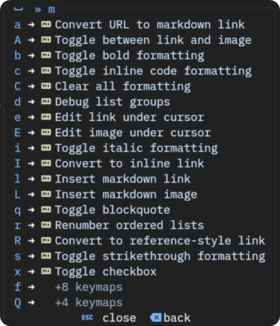
markdown-plus.nvim enhances Markdown editing in Neovim through intelligent tools and context-sensitive features. It provides smart list management, dynamic header operations, and automated table of contents generation while ensuring a lightweight, responsive experience. The plugin works within Neovim's native environment, offering intuitive keymaps and commands that accelerate common editing tasks.
The plugin covers a wide range of Markdown elements, including inline formatting, code blocks, tables, footnotes, and callouts. It automates repetitive actions such as list renumbering, link conversion, and TOC updates, allowing users to concentrate on content creation. Configurable and extensible, markdown-plus.nvim suits both basic and advanced needs, serving technical writers, developers, and users who require efficiency in Markdown editing.
Key Features-
- Smart List Management: Automatically continues lists and manages indentation, reducing manual formatting effort.
- Header Navigation: Quickly jump between sections by using keyboard shortcuts, improving workflow efficiency.
- Text Formatting Shortcuts: Apply bold, italic, and additional formatting styles by using direct keybindings.
- Callout Support: Add notes, warnings, and tips with dedicated syntax, enhancing the clarity of your documentation.
List Management
Insert Mode
| Keymap | Description |
|---|---|
<CR> |
Auto-continue lists or break out of lists |
<A-CR> |
Continue list content on next line (no new bullet) |
<Tab> |
Indent list item |
<S-Tab> |
Outdent list item |
<BS> |
Smart backspace (removes empty list markers) |
<C-t> |
Toggle checkbox in insert mode |
Normal Mode
| Keymap | Description |
|---|---|
o |
Create next list item |
O |
Create previous list item |
<leader>mr |
Manual renumber ordered lists |
<leader>mx |
Toggle checkbox on current line |
<leader>md |
Debug list groups (development) |
Visual Mode
| Keymap | Description |
|---|---|
<leader>mx |
Toggle checkboxes in selection |
Text Formatting
| Keymap | Normal | Visual | Description |
|---|---|---|---|
<leader>mb |
✓ | ✓ | Toggle bold |
<leader>mi |
✓ | ✓ | Toggle italic |
<leader>ms |
✓ | ✓ | Toggle |
<leader>mc |
✓ | ✓ | Toggle `code` |
<leader>mh |
✓ | ✓ | Toggle highlight |
<leader>mu |
✓ | ✓ | Toggle ++underline++ |
<leader>mw |
✓ | Convert to code block | |
<leader>mC |
✓ | ✓ | Clear all formatting |
Headers & TOC
Normal Mode
| Keymap | Description |
|---|---|
]] |
Jump to next header |
[[ |
Jump to previous header |
<leader>h+ |
Promote header (increase importance) |
<leader>h- |
Demote header (decrease importance) |
<leader>h1 |
Set/convert to H1 |
<leader>h2 |
Set/convert to H2 |
<leader>h3 |
Set/convert to H3 |
<leader>h4 |
Set/convert to H4 |
<leader>h5 |
Set/convert to H5 |
<leader>h6 |
Set/convert to H6 |
<leader>ht |
Generate table of contents |
<leader>hu |
Update existing table of contents |
<leader>hT |
Toggle navigable TOC window |
gd |
Follow TOC link (jump to header) |
Links & References
Normal & Visual Mode
| Keymap | Description |
|---|---|
<leader>ml |
Insert new markdown link (Normal) / Convert selection to link (Visual) |
<leader>me |
Edit link under cursor |
<leader>ma |
Convert URL to markdown link |
<leader>mR |
Convert to reference-style link |
<leader>mI |
Convert to inline link |
gx |
Open link in browser (native Neovim) |
Image Links
Normal & Visual Mode
| Keymap | Description |
|---|---|
<leader>mL |
Insert new markdown image (Normal) / Convert selection to image (Visual) |
<leader>mE |
Edit image under cursor |
<leader>mA |
Toggle between link and image |
Quotes Management
Normal & Visual Mode
| Keymap | Description |
|---|---|
<leader>mq |
Toggle blockquote on current line (Normal) / selected lines (Visual) |
Callouts/Admonitions
Normal & Visual Mode
| Keymap | Description |
|---|---|
<leader>mQi |
Insert callout (prompts for type) (Normal) / Wrap selection in callout (Visual) |
<leader>mQt |
Toggle/cycle callout type |
<leader>mQc |
Convert blockquote to callout |
<leader>mQb |
Convert callout to blockquote |
Tables
Normal Mode
| Keymap | Description |
|---|---|
<leader>tc |
Create new table interactively |
<leader>tf |
Format table at cursor |
<leader>tn |
Normalize malformed table |
<leader>tir |
Insert row below current row |
<leader>tiR |
Insert row above current row |
<leader>tdr |
Delete current row |
<leader>tyr |
Duplicate current row |
<leader>tic |
Insert column to the right |
<leader>tiC |
Insert column to the left |
<leader>tdc |
Delete current column |
<leader>tyc |
Duplicate current column |
<leader>ta |
Toggle cell alignment (left/center/right) |
<leader>tx |
Clear cell content |
<leader>tmh |
Move column left |
<leader>tml |
Move column right |
<leader>tmk |
Move row up |
<leader>tmj |
Move row down |
<leader>tt |
Transpose table (swap rows/columns) |
<leader>tsa |
Sort table by column (ascending) |
<leader>tsd |
Sort table by column (descending) |
<leader>tvx |
Convert table to CSV |
<leader>tvi |
Convert CSV to table |
Insert Mode
| Keymap | Description |
|---|---|
<A-h> |
Move to cell on the left (wraps) |
<A-l> |
Move to cell on the right (wraps) |
<A-j> |
Move to cell below (wraps) |
<A-k> |
Move to cell above (wraps) |
Note: Insert mode navigation falls back to arrow keys when not in a table.
Footnotes
Normal Mode
| Keymap | Description |
|---|---|
<leader>mfi |
Insert new footnote |
<leader>mfe |
Edit footnote definition |
<leader>mfd |
Delete footnote (reference and definition) |
<leader>mfg |
Go to footnote definition |
<leader>mfr |
Go to footnote reference(s) |
<leader>mfn |
Navigate to next footnote |
<leader>mfp |
Navigate to previous footnote |
<leader>mfl |
List all footnotes |
!!! note ""
In normal mode, these commands operate on the word under the cursor. In visual mode, they operate on the selected text.
render-markdown.nvim
render-markdown.nvim brings real-time rendering of Markdown elements directly into the Neovim buffer. It visually enhances your content by displaying headings, code blocks, checkboxes, and lists with styling, allowing you to preview your work without leaving the editor. This plugin bridges the gap between writing and visualizing, making it easier to create polished and professional Markdown documents.
Key Features-
- Live Preview: Renders Markdown elements in real-time, providing immediate visual feedback.
- Customizable Themes: Adjust the appearance of headings, code blocks, and other elements to match your preferences.
- Lightweight: Designed for performance, ensuring a smooth editing experience even with large files.
- Seamless Integration: Works alongside other Markdown plugins to create a cohesive and productive writing environment.
The combination of markdown-plus.nvim and render-markdown.nvim transforms Rocksmarker into a powerful and intuitive environment for Markdown authoring. Together, these plugins offer the modern features and visual clarity needed to create high-quality documentation, notes, and blog posts efficiently.
LSP tools
Neovim's Language Server Protocol (LSP) integration extends robust code editing features to Markdown files. By leveraging LSP clients such as nvim-lspconfig, users enable real-time diagnostics, autocompletion, hover documentation, and symbol navigation within Markdown documents. These tools enhance productivity by providing context-aware suggestions, error detection, and formatting support, all while maintaining compatibility with Neovim's modular architecture.
Key functionalities include:
- Diagnostics: Identify syntax errors, broken links, and style inconsistencies.
- Autocompletion: Contextual suggestions for headings, links, and code blocks.
- Hover Information: Preview rendered Markdown or embedded code snippets.
- Symbol Navigation: Jump between headings, links, and references efficiently.
Markdown Linting
Linting verifies Markdown files for structural and stylistic compliance. It detects syntax errors, formatting inconsistencies, unreachable links, and improper heading nesting. Tools such as markdownlint, vale, or LSP-based linters (e.g., marksman) apply user-defined rules to keep uniformity and correctness.
Key Features:
- Rule Application: Enforces standards for headings, lists, line lengths, and link integrity.
- Actionable Output: Reports violations and can offer automated corrections.
Linting streamlines documentation workflows, reduces manual reviews, and ensures consistency with project or industry standards. Configure rules to match specific guidelines or specifications.
Prose linting
Prose linting systems analyze written content for clarity, consistency, and correctness. These tools detect grammatical errors, stylistic inconsistencies, redundant phrasing, and non-inclusive language in natural language text. Solutions such as vale, proselint, or write-good integrate with editing workflows to enforce style guides and improve readability.
Core Capabilities:
- Style Enforcement: Applies rules for grammar, terminology, and voice (active/passive).
- Automation: Operates in editors (e.g., Neovim via LSP), CI pipelines, or standalone scripts.
- Customizable Rules: Supports organization-specific or industry-standard guidelines.
Prose linters enhance technical documentation, marketing content, and general writing by reducing ambiguity and ensuring adherence to defined standards. Configuration files allow tailoring checks to project requirements.
Vale
Vale is a syntax-aware linter for prose that enforces stylistic and grammatical consistency in documentation and content. It applies customizable rules to detect errors, inconsistencies, and noncompliant phrasing in natural language text. Designed for technical writers, developers, and content teams, Vale integrates with editing workflows to ensure adherence to style guides and best practices.
Key Features:
- Rule-Based Checking: Validates terminology, grammar, readability, and inclusive language.
- Extensible Rules: Supports community and custom rule sets.
-- Configure vale_ls for prose linting in Neovim.
setup_lsp_server("vale_ls", {
  -- Use extended client capabilities for full LSP feature support.
  capabilities = get_lsp_capabilities(),

  -- Specify the filetypes for which vale_ls should be activated.
  filetypes = { "markdown", "text", "tex", "rst" },

  -- Optional: Set the root directory pattern to look for '.vale.ini'
  -- root_dir = require('lspconfig.util').root_pattern('.vale.ini'),

  -- Enable single file support.
  single_file_support = true,

  -- Optional: Add any additional settings for vale_ls.
  settings = {
    -- If you have specific Vale settings, they can be added here.
  },
})
Vale improves clarity, reduces ambiguity, and standardizes writing across projects. Configuration files allow tailoring checks to specific guidelines, making it adaptable to technical, marketing, or general content.
nvim-lint with vale
nvim-lint integrates with Vale to give real-time feedback on grammar, style, and clarity in Markdown and text files. This combination brings automated prose linting directly into Neovim, enforcing consistency with customizable style guides and reducing manual reviews.
Key Features:
- Inline Diagnostics: Flags grammatical errors, terminology inconsistencies, and non-inclusive language during editing.
- Rule Customization: Supports Vale's extensible rule sets.
- Asynchronous Operation: Runs checks in the background, preserving editor responsiveness.
-- nvim-lint.nvim settings - Linting capabilities
local lint_ok, lint = pcall(require, "lint")
if not lint_ok then
  return
end

lint.linters_by_ft = {
  markdown = { "markdownlint", "vale" },
  yaml = { "yamllint" },
  bash = { "shellcheck" },
  json = { "jsonlint" },
  vim = { "vint" },
}
nvim-lint with Vale enables technical writers and developers to support high-quality, standardized content without workflow disruptions. Configure linting rules through Vale's .vale.ini and style-specific rule files.
!!! note "validates structure and prose"
`nvim-lint` is configured to run both `markdownlint` and Vale. This setup validates Markdown structure and prose quality in real time, using rules defined in `.markdownlint.json` and `.vale.ini`. Diagnostics are hidden by default; toggle visibility with <leader>dd.
harper
Harper is a prose linter that enforces consistency, clarity, and correctness in written content. It analyzes text for grammatical errors, stylistic inconsistencies, and adherence to defined standards. Targeted at documentation, APIs, and general prose, Harper integrates with development workflows to automate reviews and reduce manual edits.
Core Capabilities:
- Style and Grammar Validation: Detects deviations from configured style guides or best practices.
- Custom Rule Sets: Supports organization-specific or industry-standard rules for terminology, voice, and structure.
-- Configure Harper language server for grammar and style checking in Neovim.
-- Harper is a privacy-first, offline grammar checker for developers and writers.
setup_lsp_server("harper_ls", {
  settings = {
    -- All Harper-specific settings must be nested under the harper-ls key.
    ["harper-ls"] = {
      -- Linters configuration: enable or disable specific grammar and style checks.
      linters = {
        SpellCheck = true,
        SpelledNumbers = false,
        AnA = true,
        SentenceCapitalization = true,
        UnclosedQuotes = true,
        WrongQuotes = false,
        LongSentences = true,
        RepeatedWords = true,
        Spaces = true,
        Matcher = true,
        CorrectNumberSuffix = true,
      },

      -- Code actions configuration: control how code actions are displayed.
      codeActions = {
        ForceStable = false,
      },

      -- Markdown-specific settings: control how Harper handles Markdown files.
      markdown = {
        IgnoreLinkTitle = false,
        IgnoreCodeBlocks = true,
        IgnoreInlineCode = true,
        CheckLists = true,
        CheckHeadings = true,
      },

      -- Set the severity level for diagnostics.
      -- Options: "error", "warning", "information", "hint"
      diagnosticSeverity = "hint",

      -- Isolate English language checks to avoid false positives in mixed-language documents.
      isolateEnglish = true,
    },
  },
})
Harper helps teams maintain high-quality, uniform documentation and content. Its configurable ruleset system allows adaptation to project-specific or domain-specific requirements.
Validation and verification
Syntax validation ensures Markdown files comply with structural rules. It identifies issues such as unclosed code blocks, improper list nesting, or wrong metadata. LSP-based tools parse content to flag syntax errors, enabling corrections before publication.
Link verification confirms the integrity of all hyperlinks in Markdown. It validates
- Link accessibility (HTTP status, endpoint response)
- Anchor existence (internal reference targets)
- URL format (syntax, completeness)
LSP integrations automate these checks during editing or in build workflows. Configuration options support custom rules for domains, timeouts, and exclusions. Together, these processes maintain document accuracy and reduce manual validation efforts.
marksman
Marksman is a language server for Markdown that provides real-time syntax validation, semantic analysis, and linting. It ensures structural correctness, detects formatting inconsistencies, and verifies link integrity within Markdown files. Designed for integration with code editors, Marksman leverages the Language Server Protocol (LSP) to deliver immediate feedback during editing.
Key Features:
- Syntax and Structure Validation: Identifies malformed elements, improper nesting, and metadata errors.
- Link and Reference Checking: Validates internal/external links, anchors, and cross-references.
- Editor Integration: Works seamlessly with Neovim and other LSP-compatible editors for inline diagnostics and autocompletion.
-- Marksman provides advanced Markdown language features such as syntax checking,
-- formatting, and navigation.
setup_lsp_server("marksman", {
  -- The `get_lsp_capabilities()` function returns a table of capabilities that enhance
  -- the interaction between Neovim and the LSP server.
  capabilities = get_lsp_capabilities(),

  -- Specify the filetypes for which Marksman should be activated.
  filetypes = { "markdown", "md" },
})
Marksman enhances documentation workflows by automating error detection and enforcing consistency. Its rule-based approach supports customization for project-specific or organizational standards.
markdownlint
markdownlint is a static analysis tool that enforces consistent style and syntax in Markdown files. It detects common issues such as inconsistent heading levels, improper list indentation, broken links, and non-standard formatting. Designed for developers and technical writers, markdownlint integrates with editors, build systems, and version control workflows to keep clean, readable documentation.
Core Functionality:
- Rule-Based Linting: Applies configurable rules for structure, syntax, and style (e.g., line length, heading increments, link validity).
- Automated Checks: Runs in CI pipelines, pre-commit hooks, or editor plugins (e.g., Neovim via
null-lsorefmls). - Customizable Rules: Supports disabling or adjusting rules via configuration files to match project requirements.
markdownlint reduces manual review efforts and ensures Markdown content adheres to defined standards, improving maintainability and professionalism.
Real-Time markdown linting
nvim-lint is a Neovim plugin that provides asynchronous linting for various file types, including Markdown. When configured with markdownlint rules, it delivers immediate feedback on style and syntax issues directly in the editor. This integration helps keep consistency, catch errors early, and enforce best practices without leaving the development environment.
Key Features:
- Inline Diagnostics: Highlights problems such as inconsistent headings, list formatting, or broken links as you edit.
- Custom Rule Support: Uses
markdownlintconfigurable ruleset to align with project or team-specific conventions. - Non-Blocking Workflow: Runs linting in the background, ensuring responsive editing even in large documents.
nvim-lint combined with markdownlint automates quality checks, reduces manual reviews, and streamlines Markdown authoring in Neovim. You manage configuration through .markdownlint files to adapt flexibly to different standards.
Automated Formatting and Linting
conform.nvim is a Neovim plugin for lightweight, asynchronous formatting and linting. When paired with markdownlint, it enforces style and structural rules in Markdown files, providing both automated fixes and real-time diagnostics. This integration ensures consistent formatting and error-free documentation directly within the editor.
Key Features:
- On-Save Linting: Validates Markdown against
markdownlintrules during file saves or on-demand. - Auto-Correction: Applies fixable rule violations (e.g., list indentation, heading increments) automatically.
- Seamless Integration: Works alongside LSP and other Neovim plugins for a unified editing experience.
conform.nvim with markdownlint reduces manual intervention, standardizes documentation, and accelerates workflows by merging linting and formatting into one tool. You configure it through conform.nvim setup and .markdownlint rule files.