Language Server Protocol (LSP)
A modern approach to code intelligence
The Language Server Protocol (LSP) is a standardized communication protocol developed by Microsoft™ to enable real-time language analysis and intelligent code editing across different editors and IDE (Integrated Development Environment).
By decoupling language-specific logic from the editor itself, LSP allows developers to use advanced features such as autocompletion, diagnostics, code navigation and refactoring, regardless of the programming language or toolchain.
This protocol has revolutionized the way developers interact with code, making it possible to offer consistent, high-quality language support in any editor that implements LSP.
LSP in Neovim
Neovim includes a built-in LSP client that integrates with
language servers to give IDE features. The implementation maintains Neovim's
performance and extensibility while delivering code completion,
diagnostics and symbol navigation.
This native support ensures a consistent experience across languages and
workflows.
LSP in Rocksmarker
Rocksmarker leverages Neovim's native LSP client to enhance editing for
code-intensive documentation and multi-language projects. The integration
uses mason.nvim, nvim-lspconfig, and mason-lspconfig.nvim to
streamline language server management.
- This setup provides:
-
Simplified installation and configuration of LSP servers
-
Consistent access to code intelligence, diagnostics, and refactoring tools
-
Maintained editor responsiveness during language server operations
The result is a unified workflow for coding, debugging, and technical writing within the same environment.
LSP client capabilities
The get_lsp_capabilities function configures and returns a table of
Language Server Protocol (LSP) client capabilities, optimized for
Markdown rendering and enhanced completion functionality.
This function is essential for integrating Neovim with LSP servers, ensuring that features such as rich documentation formatting, snippet support, and interactive completion are fully utilized.
| lua/plugins/lsp.lua - Function signature | |
|---|---|
3 4 5 | |
The function initializes the LSP client capabilities and extends them to support:
- Markdown formatting in documentation and completion items.
- Advanced completion features such as snippets, pre-selection, and tag support.
| lua/plugins/lsp.lua - Initialize default capabilities | |
|---|---|
7 | |
- Creates a table of default LSP client capabilities using Neovim's built-in
make_client_capabilitiesfunction.
| lua/plugins/lsp.lua - Extend capabilities with blink.cmp | |
|---|---|
9 10 11 12 13 14 15 16 | |
- Attempts to load the
blink.cmpmodule. - If successful, extends the capabilities using
blink.cmp.get_lsp_capabilities. - If
blink.cmpis not available, logs a warning and proceeds with default capabilities.
| lua/plugins/lsp.lua - Ensure required structure | |
|---|---|
19 20 21 | |
- Ensures the nested structure for
textDocument.completion.completionItemexists to avoid nil errors.
| lua/plugins/lsp.lua - Define new capabilities | |
|---|---|
24 25 26 27 28 29 30 31 32 33 34 35 36 37 38 39 40 | |
- Defines a table of additional capabilities:
documentationFormat
Defines the format used for rendering documentation in completion items. Supports both Markdown (for rich formatting) and plain text (for simplicity).
snippetSupport
Enables the use of snippet syntax (e.g., placeholders, variables) within completion items. This allows dynamic insertion of code templates or patterns, improving productivity for repetitive tasks.
preselectSupport
Controls whether the completion provider can preselect an item in the suggestion list. Useful for prioritizing frequently used or contextually relevant suggestions.
insertReplaceSupport
Determines whether completion items support insert or replace operations. Insert adds new text, while replace overwrites existing text at the cursor position. This is critical for precise code edits.
labelDetailsSupport
Provides additional metadata for completion items, such as type annotations, descriptions, or icons. Enhances readability and helps users distinguish between similar suggestions.
deprecatedSupport
Indicates whether completion items can be marked as deprecated. Deprecated items are visually distinct (e.g., strikethrough) and may include warnings or alternatives.
commitCharactersSupport
Lists characters that, when typed, automatically trigger completion. For example, typing => or . could invoke suggestions, streamlining workflows in specific contexts.
tagSupport
Allows completion items to be tagged with custom labels (e.g., class, method, deprecated). Tags enable filtering, grouping, or applying visual styles to items in the completion list.
resolveSupport
Specifies properties of a completion item that require further resolution after selection. For example, lazy-loading additional details or dynamically fetching documentation when an item is chosen.
| lua/plugins/lsp.lua - merge new capabilities | |
|---|---|
43 44 45 | |
- Iterates over
new_capabilitiesand merges each key-value pair into the existing capabilities table.
| lua/plugins/lsp.lua - Return result | |
|---|---|
47 | |
- Returns the extended capabilities table.
blink.cmp not available
If blink.cmp is unavailable, the function falls back to default
capabilities with a warning.
The function ensures backward compatibility by checking for existing nested
tables before extending them.
Setting up with error handling
The setup_lsp_server function configures and initializes an LSP server by
using provided settings. It implements error handling and extends server
capabilities during setup.
| lua/plugins/lsp.lua - Function signature | |
|---|---|
51 52 53 | |
The function sets up an LSP server with the following features:
- Validates Neovim version compatibility.
- Merges default capabilities with user-provided configuration.
- Handles set up errors gracefully.
| lua/plugins/lsp.lua - Check version compatibility | |
|---|---|
55 56 57 58 | |
- Checks for
vim.lsp.config, a requirement in Neovim 0.11 and later. - If unavailable, logs an error and exits the function.
| lua/plugins/lsp.lua - Set up the LSP server | |
|---|---|
61 62 63 | |
- Uses
pcallto try server setup within a protected call. - Merges the default capabilities (from
get_lsp_capabilities) with the user-providedconfigtable usingvim.tbl_deep_extend. - The
forceoption ensures the default capabilities are not overridden bynilvalues in the user configuration.
| lua/plugins/lsp.lua - Error handling | |
|---|---|
65 66 67 | |
- If the setup fails, logs an error message including the server name and the specific error.
-- Configure Taplo language server for TOML file support in Neovim.
setup_lsp_server("taplo", {
  -- Settings specific to Taplo LSP.
  settings = {
    -- Formatting configuration: enable or disable automatic formatting.
    format = {
      enable = true,
    },
  ....
  ....
  -- Specify the filetypes for which Taplo should be activated.
  filetypes = { "toml" },
})
- Calls
setup_lsp_serverwith the server name and a configuration table. - The setup process merges the configuration table with the default capabilities.
Neovim version control
The function checks the Neovim version and only sets up the LSP server if
vim.lsp.config is available. It catches and reports any setup errors by using
vim.notify.
Completion engine
blink.cmp is a high-performance completion engine for Neovim, designed
to offer fast, customizable, and context-aware code completion.
Built as a plugin, it integrates seamlessly with Neovim's native Language Server Protocol (LSP) and other completion sources, offering a unified interface for autocompletion across programming languages and file types.
| lua/plugins/lsp.lua - blink.cmp configuration | |
|---|---|
254 255 256 257 258 259 260 261 262 263 264 265 266 267 268 269 270 | |
The plugin emphasizes efficiency, leveraging Lua for both core logic and fuzzy matching to minimize latency and external dependencies.
blink.cmp settings
The blink.cmp plugin configuration defines keymaps, command-line mode
behavior, and fuzzy matching settings for Neovim's code completion system.
keymap = {
  preset = "super-tab",
  ["<ESC>"] = { "cancel", "fallback" },
}
preset- Uses the
super-tabpreset, enabling Tab and Shift+Tab for navigating completion suggestions.
["<ESC>"]: Maps the Esc key to cancel the completion menu and fall back to default behavior. - Command-line mode settings
cmdline = { keymap = { preset = "default", }, } preset- Applies the
defaultkeymaps preset for command-line mode completion.
Configures completion behavior in Neovim's command-line mode (e.g.,/,:,>). - Fuzzy matching settings
fuzzy = { implementation = "lua", } implementation- Specifies the algorithm for fuzzy matching in completion results.
Uses the Lua-based fuzzy matching algorithm for filtering completion results.
Summary
These configurations give a streamlined setup for LSP and completion in Neovim:
- Capabilities: Extend LSP features with Markdown and advanced completion support.
- Server Setup: Initialize LSP servers with error handling and merged configurations.
- Completion: Configure
blink.cmpfor intuitive keymaps, command-line support, and fuzzy matching.
This setup ensures efficient, customizable, and reliable code completion.
Plugin details
nvim-lspconfig
nvim-lspconfig provides server-specific configurations for LSP servers
and integrates with Neovim's built-in LSP client using vim.lsp.config (Neovim
0.11+), which replaces the deprecated require('lspconfig') API.
For server installation and management, which nvim-lspconfig does not
handle, Rocksmarker uses mason.nvim. This approach simplifies setup
for autocompletion, diagnostics, code navigation, and refactoring while
supporting full customization of server settings and capabilities.
Key features
Preconfigured Server Setups
Offers ready-to-use configurations for most LSP servers, reducing the need for manual server-specific tuning.
Native Neovim Integration
Works seamlessly with Neovim's built-in LSP client (vim.lsp.config), ensuring compatibility and performance without additional layers.
Streamlined Workflow
Minimizes setup complexity by automating common LSP configurations, allowing users to focus on development rather than configuration.
Flexible Customization
Allows fine-grained adjustments to server settings and capabilities, enabling tailored LSP behavior for different projects or workflows.
Settings
With the transition to Neovim 0.11+ and the adoption of vim.lsp.config,
nvim-lspconfig no longer requires explicit plugin settings for basic
functionality. The new implementation automatically detects and loads server
configurations. This eliminates the need for manual setup of the plugin itself,
as Neovim's native LSP client handles core integration.
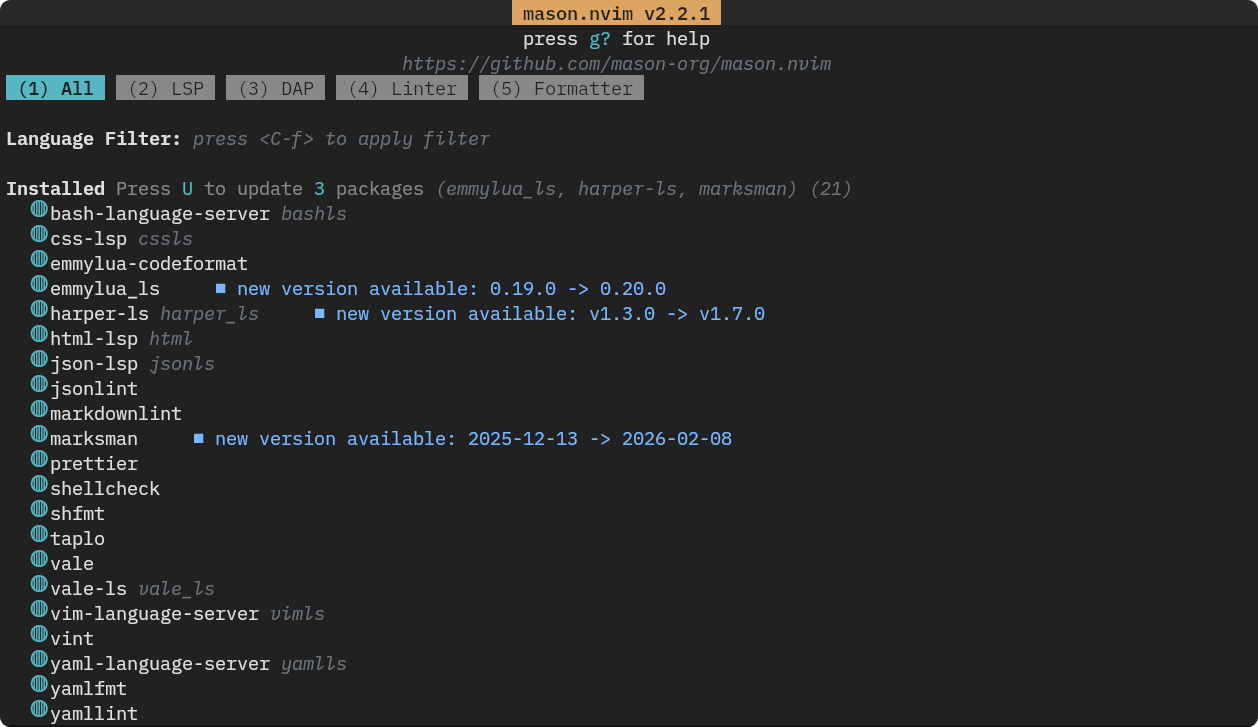
mason.nvim
mason.nvim is a portable and intuitive plugin designed to simplify the
management of external editor tools, including LSP servers, linters,
formatters, and debuggers.
It provides a unified and user-friendly interface within Neovim, allowing
you to discover, install, update, and manage essential development tools
without leaving your editor.
Key features
Centralized Management
Install, remove, and organize LSP servers, linters, formatters, and other
tools by using a single, streamlined interface.
Effortless Updates
Automatically updates all installed LSP servers and tools to the latest versions,
ensuring access to new features, bug fixes, and performance improvements.
Seamless Integration
Works in conjunction with mason-lspconfig.nvim and nvim-lspconfig,
providing automated setup for language servers and related tools.
Extensible Ecosystem
Supports a wide range of tools across many programming languages, making it a
versatile solution for diverse development needs.
Mason - main screen
Settings
This code initializes Mason for managing LSP servers and related tools in Neovim.
| lua/plugins/lsp.lua - mason setup | |
|---|---|
179 180 181 182 183 184 185 186 187 | |
- First, it checks if
mason.nvimis available usingpcall. If the plugin is not installed, it logs an error notification and exits. - If
mason.nvimis available, it initializes Mason with default settings usingmason.setup({}).
This minimal setup ensures Mason is ready to install and manage LSP servers and other development tools, but does not configure any servers or tools directly.
mason-lspconfig.nvim
mason-lspconfig.nvim serves as a critical bridge between
mason.nvim and nvim-lspconfig, automating the registration and
configuration of language servers installed through mason.nvim.
This plugin ensures that your LSP servers are properly set up and ready to use, eliminating the need for manual configuration and reducing setup time.
Key features
Automatic Configuration
Seamlessly configures LSP servers installed through mason.nvim, ensuring they
integrate smoothly with Neovim's built-in LSP client.
Guaranteed Compatibility
Verifies that all LSP servers are fully compatible with nvim-lspconfig,
preventing conflicts and ensuring optimal performance.
User-Friendly Setup
Simplifies the process of enabling and customizing LSP servers, allowing you
to focus on coding rather than configuration.
Streamlined Workflow
Accelerates the setup of language servers, making it easier to keep a
consistent and efficient development environment.
Setting
This code establishes a bridge between the tool manager and a language server configuration system, automating both installation and setup of language servers.
| lua/plugins/lsp.lua - lsp server install | |
|---|---|
189 190 191 192 193 194 195 196 197 198 199 200 201 202 203 204 205 206 207 208 209 210 211 212 213 214 215 216 217 218 | |
The code starts by attempting to load mason-lspconfig by using pcall.
- If the plugin is not found, it displays an error notification and terminates execution.
- If successful, it calls
mason_lspconfig.setup()with two key configurations:
ensure_installed
Specifies a list of LSP servers (e.g., emmylua_ls, html, vale_ls) that Mason will automatically install. This ensures all required language servers are available without manual intervention.
handlers
Defines a callback function that invokes setup_lsp_server(server_name, {}) for each installed server. This handler automatically configures each server with Neovim's LSP client, leveraging the setup_lsp_server function to apply consistent settings.
This code combines both configurations to remove manual setup steps, so all listed language servers install and register automatically with Neovim's LSP client. The approach minimizes configuration requirements, using the server list and handler function to manage the process.
mason-tool-installer.nvim
mason-tool-installer.nvim automates the installation and management of development tools, including LSP servers, linters, formatters, and other utilities required for project-specific workflows.
By accepting a declarative list of tools as input, the plugin ensures the development environment has all specified dependencies without manual intervention. It integrates with package managers to fetch, install, and update tools automatically, reducing configuration overhead and eliminating discrepancies between environments. This approach standardizes tool availability, accelerates environment setup, and maintains consistency across development workflows. The plugin supports both project-level and user-level configurations, allowing flexible tool management for different use cases.
Key features
Automatic Installation
Installs LSP servers and related tools automatically during the setup process,
ensuring everything is ready to use from the start.
Dependency Management
Resolves and installs all necessary dependencies, reducing the risk of missing
components or configuration errors.
Seamless Integration
Works in tandem with mason.nvim and mason-lspconfig.nvim to offer a
complete tool management solution, from installation to configuration.
Settings
This code configures mason-tool-installer.nvim to automate the
installation of formatting, linting, and utility tools managed by
mason.nvim.
| lua/plugins/lsp.lua - linters/formatters install | |
|---|---|
220 221 222 223 224 225 226 227 228 229 230 231 232 233 234 235 236 237 238 239 240 241 242 243 244 | |
- It starts by checking the availability of
mason-tool-installerusingpcall. If the plugin is not installed, it logs an error notification and exits. - If available, it initializes the plugin with a list of tools
(
ensure_installed) that Mason will install automatically. The specified tools (e.g.,rumdl,vale,stylua,prettier) cover a range of use cases, including Markdown linting, prose validation, Lua formatting, and JSON validation.
The configuration enables auto_update to keep up-to-date tools and sets
run_on_start to true, which installs or updates tools automatically at Neovim
start. This approach eliminates manual tool installation and updates,
delivering a seamless development workflow setup.
Integrated LSP management
These plugins combine to create a unified ecosystem for Language Server
Protocol (LSP) tools. They automate server configuration, dependency
management, and client communication, removing the need for manual setup.
The system manages initialization, error handling, and performance tuning
automatically.
This allows developers and technical writers to focus on coding, documentation, and productivity without distractions from underlying infrastructure. The outcome is a responsive, reliable, and maintenance-free environment for advanced language features.